Dev blog: LIMA 1.9

This release introduces a brand-new guided onboarding experience for first-time users, adds more AI model choices, and reduces CPU usage so LIMA runs lighter in the background.

New Features

  • LIMA now greets new users with a guided onboarding flow. On first run it welcomes you, asks for your name, and walks you through the main window and the four global hotkeys. The whole tour is spoken aloud and answered by typing — you can say “next”, “repeat”, or “skip”.
  • Added GPT-5.5 as a selectable AI model. Added the Kimi K2.6 model (replacing GPT-5.2). Kimi K2.5 is now marked as legacy.
  • AI model options in Settings now include short descriptions to help you pick the right model for your needs.
  • Added voice previews for Vietnamese and Tagalog so you can hear a voice before selecting it.

Changes

  • Reduced CPU usage in both idle and active voice modes, so LIMA is lighter on your system while listening and while waiting.

Dev blog: LIMA 1.8

New Features

  • Added Taglog language option in the installer.
  • You can now control how much conversation history LIMA keeps (10–50 messages) and how many screenshots it sends per request (1–5) in Settings.
  • Four new voices have been added.
  • LIMA now handles YouTube narration and Quick Input in Vietnamese and Tagalog.

Bug Fixes

  • Fixed an issue that caused Tagalog text to speech to fail.
  • Fixed DVS narration and screen observation audio playing simultaneously.
  • Fixed an issue where audio from before a dropped connection would replay after reconnection.

Dev Blog - LIMA 1.7.9.3

This release introduces Facebook video narration, faster responses, waiting sound audio queues, and a range of stability and bug fixes.

New Features

  • Streaming TTS is now enabled by default increasing response times.
  • Added Facebook video support to Descriptive Video Service (DVS).
  • Added a waiting sound that plays during long-running tools.
  • Added a new “Fastest” TTS playback speed option.

Dev Blog - LIMA 1.7.7.1

This release focuses on voice enhancements, improved JAWS accessibility, stability and crash fixes.

New Features

  • Added 4 new voices with British and Australian accents.
  • Added a voice preview button.
  • New hotkey - Voice Mode Toggle (Ctrl+Alt+U).
  • Enhanced compatibility with JAWS.
Helping a Loved One Cope with Vision Loss: 5 Evidence-Based Tips for Families

Helping a Loved One Cope with Vision Loss: 5 Evidence-Based Tips for Families

Nearly 453,000 Australians are estimated to suffer from blindness or low vision, according to Vision Australia. In this blog, we share five research-backed tips on how to support your family member through this challenging period.

Dev Blog - LIMA 1.7.5.1

This release focuses on tool improvements, performance optimizations, and reliability.

New Features

  • Added voice control tool with speed and voice selection.
  • Improved mouse click speed by 30%.
  • General 5% increased speed across the software.

Dev Blog - LIMA 1.7.4.1

This release focuses on critical bugfixes and adds GPT-5.3 from OpenAI.

New Features

  • Added GPT-5.3 (OpenAI).
  • Updated Vietnamese language support.
  • Added end-turn confidence threshold slider in settings.

Dev Blog - LIMA 1.7.3.4

This release focuses on improved speech input through automatic end of turn detection, speeding up response times. It also adds a “quick input” hotkey that allows you to type instructions to LIMA. Settings have also been greatly expanded.

New Features

  • New speech detection system, automatically detects when you have finished speaking.
  • Added new pop up text input widget, enables text input while keeping LIMA in the background (Ctrl+Alt+H).
  • Adjusted default TTS speaking speed from fast to medium.
  • Made Base AI model configurable in settings: GPT-5.2 (OpenAI), Llama 4 Maverick (Meta), Kimi K2.5 (Moonshot).
  • Added end-turn confidence threshold configuration for speech detection.

Bug Fixes

  • Added missing Text-to-Speech announcements when settings are changed.
  • Improved settings UI increasing compatibility with more screen types.

Dev Blog - LIMA 1.7.2.2

This changelog covers bug fixes, features, and improvements added since version 1.7.0.2. The changes bring a new feature to handle websites with constantly changing elements as well as stability and bugfixes.

New Features

  • Dynamic Website Narration (DWN): extends LIMA's narration capabilities beyond YouTube videos to any website content, including content that updates without user input like carousels.
  • Switched to improved vision model for YouTube narration.
  • Auto Re-Launch After LIMA Update.
  • Reduced starting latency on cold sessions.
  • Added settings toggles for Dynamic Website Narration and Descriptive Video Service.

Bug Fixes

  • Fixed Descriptive Video Service failing to restart a YouTube video after narration.
  • Addressed text to speech falling back to system voice in Descriptive Video Service.
  • Improved tooltips and accessible names for UI elements.

Dev Blog - LIMA v 1.7.0.2

This changelog covers bug fixes, features, and improvements added since version 1.6.9. The changes represent significant enhancements to the text-to-speech system, descriptive video service, tool execution, and stability.

New Features

  • Implemented new Voice System capable of reading underscores, hyphens, Celsius, dollars and related symbols.
  • Added links to LIMA's Documentation.
  • Added 4 new natural voices.
  • Improved speed of the observation tool.
  • Added Descriptive Video Service support for Brave browser.
  • Added a “press enter” tool.

Bug Fixes

  • Fixed Descriptive Video Service pause/resume crash.
  • Fixed start-up crash caused by Speech to Text.
  • Fixed Observe screen hotkey (Ctrl+Alt+J).
  • Fixed broken “create memory” tool and “press windows key” tool.
Gartner AI hype-cycle chart 2025

Beyond the Panic: What AI Really Means for Work

Every time a new AI model launches, the same old panic ripples through the newsfeed. But instead of freeing us, AI often makes us busier — we don't suddenly have more free time, we just move faster into new opportunities and new challenges.

The Productivity Illusion

  • Reports that once took weeks can now be generated in minutes.
  • Drafts, prototypes, or insights arrive instantly instead of painfully slow.

AI doesn't replace — it amplifies. That means we need to step up, not sit back.

Why “Replacement” Is Overhyped

Despite the noise, AI adoption in business isn't happening overnight. The real obstacles aren't technical — they're human: processes, policies, training, and culture.

Where AI Still Struggles

  • Aligning teams around priorities.
  • Designing processes that can scale.
  • Navigating compliance, ethics, and trust.
  • Building technology that people can actually use.

At Roscommon Systems, our Low-Vision Intelligent Machine Assistant (LIMA) acts as a real-time digital companion — interpreting screens, narrating UI changes, responding to voice commands, and describing images and alerts. LIMA is not about substituting humans — it's about augmenting them.

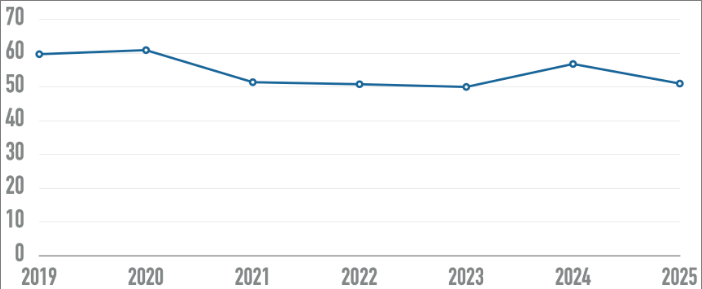
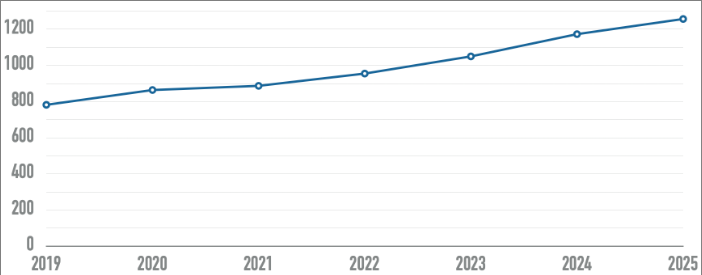
Average number of detectable errors per home page over timeNumber of home page elements detected over the last seven WebAIM Million studies

A Web for Everyone? Not Yet.

Why do millions still struggle to access the internet's most popular sites? The latest WebAIM Million report, which analyzed one million homepages, reveals a sobering truth: while accessibility has improved slightly, barriers remain everywhere.

A Step Forward… But Miles to Go

This year, accessibility errors dropped from 57 to 51 per homepage — a 10% improvement. Yet 95% of websites still fail basic accessibility checks.

Everyday Barriers That Exclude

  • Low-contrast text that disappears for those with low vision.
  • Missing image descriptions that leave screen readers silent.
  • Unlabeled form fields that turn sign-ups into guessing games.
  • Vague links and buttons that make navigation nearly impossible.

At Roscommon, our Low-Vision Intelligent Machine Assistant (LIMA) empowers individuals with real-time screen interpretation, voice-command navigation, and seamless digital interaction — bridging the gap between independence and accessibility while we fight for a truly accessible web tomorrow.

Here's what happens when AI reaches superhuman intelligence

With the release of o3 and o4 models by OpenAI, the industry has reached a turning point where AI is ranking higher than the average human on IQ tests. As of writing, o3 scores 116 IQ on the Mensa Norway IQ test, with Google's Gemini 2.5 Pro following at 115.

So what does this mean for humans? By conventional wisdom, this is the point where AI can begin to self-improve, leading to an intelligence explosion humans cannot control. So does this spell the beginning of the end for humanity? In short, no.

The famous Terman Study of the Gifted followed a cohort of children with IQs of 140 and above. While high IQ correlated with college completion, many subjects pursued typical careers — intellect and achievement are far from perfectly correlated.

What is missing from ultra-high IQ is the ability to launch nuclear weapons. Learning new and abstract topics does not magically provide the ability to do great harm, nor does it circumvent the safeguards states use to prevent unauthorized actions.

A superintelligent AI will only have a survivalist instinct to take out humanity if humans actually train it that way — and any malicious AI is still subject to the same constraints, like law enforcement, firewalls, and encryption, that a malicious human is.